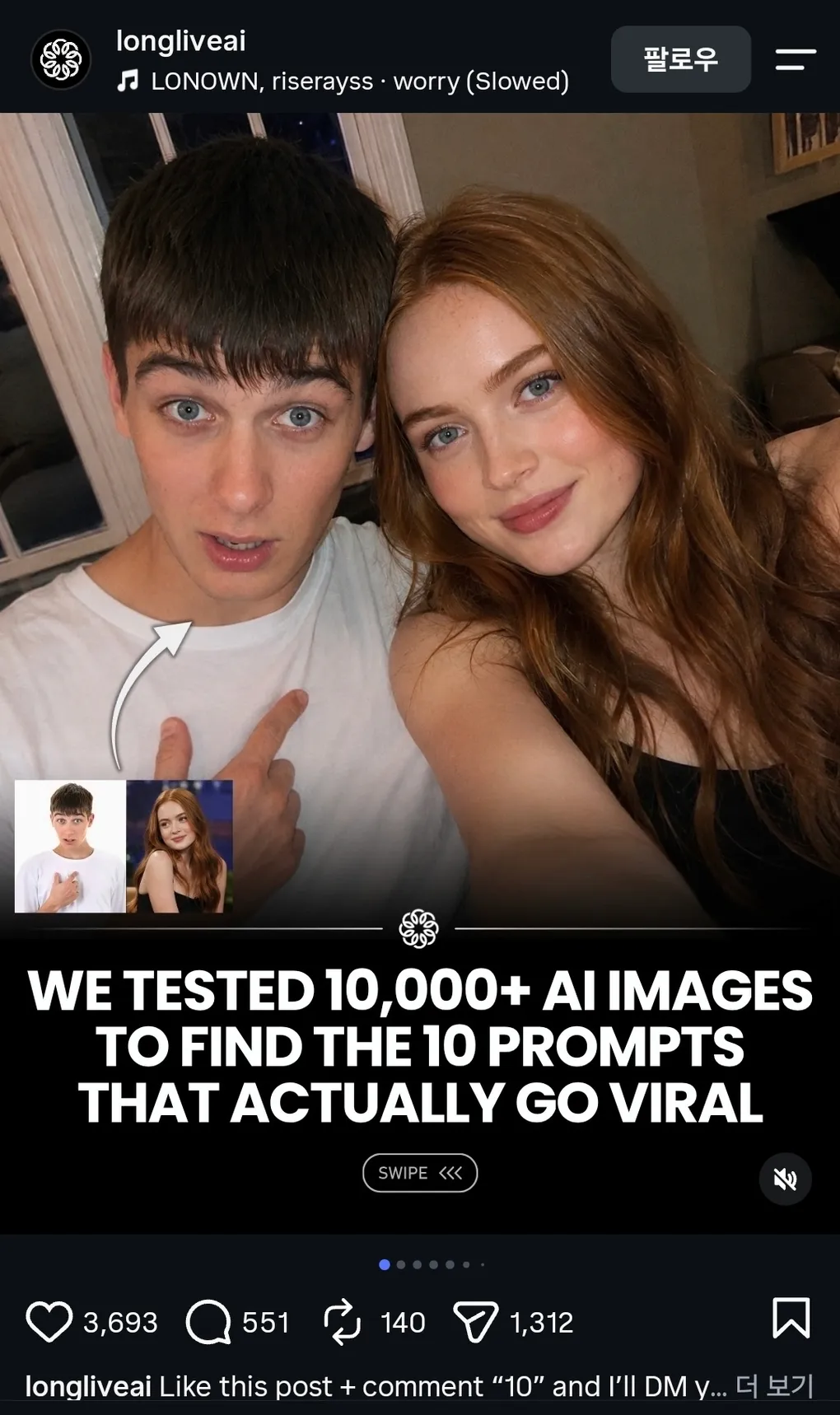
터진 AI 필터 프롬프트 10개, 전부 정리했어요
한 줄 요약: longliveai 계정이 “1만 장 테스트로 찾았다”며 DM 뒤에 숨긴 필터 프롬프트 10개를 릴스 전 페이지에서 전부 확인해, 해설과 프롬프트 전문까지 통째로 정리했어요. 9개가 ’기존 사진을 다른 형식의 컷으로 바꾸는 변환 필터’였어요.
longliveai라는 계정의 릴스가 “우리는 1만 장이 넘는 AI 이미지를 테스트해서, 실제로 터진 10개 프롬프트를 찾았다”고 시작해요. 표지는 젊은 남성이 배우 새디 싱크로 보이는 인물과 나란히 찍은 듯한 AI 셀프카메라예요. 캡션은 “좋아요를 누르고 댓글로 ’10’을 달면 10개 프롬프트를 전부 DM으로 보내 줄게요”로 끝나요. 스크린샷 기준 좋아요 3,693개에 보내기 1,312회. 목록은 DM 뒤에 숨겨져 있지만, 게시물 자체는 공개 릴스이라 슬라이드를 전부 확인하면 10개가 모두 나와요. 이 글에서는 그 10개를 하나씩 정리하고, 각 필터의 프롬프트 전문을 통째로 옮겨 담은 뒤, 공통 문법과 이 계정의 영업 구조까지 짚어 보겠어요.
10개 필터 한눈에 보기
| # | 필터 이름 | 하는 일 |
|---|---|---|
| 1 | 4K Effect | 흐릿한 사진을 4K 화질로 복원 |
| 2 | Skin Enhancer | 스무딩 없는 자연스러운 피부 보정 |
| 3 | GTA Effect | 장면 전체를 GTA V 게임 렌더로 변환 |
| 4 | Minecraft Effect | 인물은 실사, 배경만 마인크래프트 복셀로 |
| 5 | Professional Portrait | 스튜디오 프로필 헤드샷으로 변환 |
| 6 | White Studio Effect | 배경을 화이트 스튜디오 광고 컷으로 교체 |
| 7 | LEGO World Effect | 인물은 실사, 배경만 레고로 재건 |
| 8 | Flow Effect | 배경을 픽셀 스트레치 아트로 흘려보냄 |
| 9 | Group Selfie | 레퍼런스 2장을 실사 셀피로 합성 |
| 10 | Anime Effect | 사진을 2D 애니메이션 프레임으로 변환 |
하나씩 살펴 보겠어요. 예시 이미지는 전부 게시물에 실린 before/after 기준이고, 코드 블록은 각 슬라이드에 공개된 프롬프트 전문(영문)이에요.
1. 4K Effect: 흐릿한 사진을 되살리는 업스케일 필터예요. 예시로 실제 인물 사진(트럼프가 군중 속에서 카메라를 가리키는 컷)을 고르고, 뭉개진 왼쪽을 선명한 오른쪽으로 바꿔 보여 줘요. 프롬프트는 “참조 이미지에 절대적으로 충실할 것, 표정·시선·포즈·구도는 전혀 틀리지 말 것, 잡티만 제거하고 선명도와 다이내믹 레인지만 늘릴 것”이라는 충실도 지시의 집합이에요.
Ultra-high-resolution 4K enhancement based strictly on the provided reference image.
Absolute fidelity to original facial anatomy, proportions, and identity. Preserve
expression, gaze, pose, camera angle, framing, and perspective with zero deviation.
Clothing, hair, skin, and background elements must remain unchanged in structure,
placement, and design. Recover fine-grain detail with natural realism. Enhance pores,
fine lines, hair strands, eyelashes, fabric weave, seams, and material edges without
introducing stylization. Maintain original color science, white balance, and tonal
relationships exactly as captured. Lighting direction, intensity, contrast, and shadow
behavior must match the source image precisely, with only improved clarity and
expanded dynamic range. No relighting, no reshaping. Remove any grain. Apply controlled
sharpening and high-frequency detail reconstruction. Remove compression artifacts and
noise while retaining authentic texture. No smoothing, no plastic skin, no artificial
gloss. Facial features must remain consistent across the entire image with coherent
anatomy and clean, stable edges. Negative constraints: no warping, no facial drift,
no added or missing anatomy, no altered hands, no distortions, no perspective shift,
no text or graphics, no hallucinated detail, no stylized rendering. Output must read
as a true-to-life, photorealistic upscale that matches the reference exactly, only
clearer, sharper, and higher resolution.
2. Skin Enhancer: 자연스러운 피부 보정이에요. “스무딩 없이 질감만 정제하고, 모공·주근깨·자연스러운 변화는 유지하며, 일시적 트러블과 홍조만 줄일 것”이라는 조건이 반복돼요. 예시는 저스틴 비버로 보이는 인물의 before/after죠. 보정 티가 안 나는 보정, 즉 ’안 보이는 편집’을 목표로 해요.
Skin enhancement retouch, preserve original identity and structure, refine skin
texture without smoothing, maintain pores, freckles, and natural variation, reduce
temporary blemishes and redness only, even out tone subtly without flattening depth,
retain natural highlights and shadow transitions, keep under-eye detail intact with
slight softening not removal, avoid plastic or airbrushed finish, maintain original
lighting and color balance, enhance micro-contrast for realistic texture, lips and
eyes untouched except for natural clarity, no reshaping of facial features, no
artificial glow, no over-sharpening, seamless integration with original image,
invisible edit with high realism.
3. GTA Effect: 이번엔 스타일이 완전히 바뀌어요. “필터를 씌우지 말고, 장면 전체를 GTA V 레이지 엔진의 실시간 3D 렌더로 재구축하라”는 지시예요. 마지막 문장이 “명백히 사진이 아닐 것”이라는 점이 재미있어요. 게임 캡처처럼 보이는 걸 목표로 하는 필터예요.
Rebuild the entire scene from the reference image as a real-time 3D render inside
the GTA V Rage engine. Do not apply a filter. Fully reconstruct all people, vehicles,
architecture, terrain, and props as polygonal 3D assets native to GTA V. The result
should look like an authentic in-game screenshot captured on a high-end PC, ultra
settings enabled. All subjects must be converted into clearly modeled geometry with
visible polygon structure, baked normal maps, and game-ready textures. Faces, bodies,
and clothing should follow GTA V character proportions and anatomy, slightly
exaggerated, rigid, and digitally sculpted. Skin is matte and textured, no
photographic pores. Hair is clumped, card-based, slightly stiff. Clothing uses flat
fabric shaders with visible seams and texture repetition. Environment must feel like
Los Santos or Blaine County logic. Buildings are modular, edges slightly sharp,
surfaces tiled and optimized. Roads, sidewalks, vegetation, street props, and
background elements are simplified but dense, clearly game-built constructed. No
real-world photographic depth or lens artifacts. Lighting follows GTA V real-time
lighting behavior. Strong directional sunlight or overcast skylight depending on
scene. Hard shadows with defined edges, subtle ambient occlusion in corners.
Reflections are screen-space and imperfect. Colors are slightly saturated with the
recognizable GTA V color grading. Contrast is controlled but punchy. Materials must
read as video game assets. Asphalt is flat and grainy. Metal has simple specular
highlights. Glass is clean with limited reflection depth. Vegetation is slightly
stiff and stylized. Nothing should appear physically accurate or cinematic-render
realistic. Camera should feel like a gameplay or Rockstar Editor capture. Third-person
or free camera perspective. Slight wide-angle distortion. Stable framing. No depth of
field blur. No motion blur unless minimal and engine-based. Overall look is
unmistakably GTA V. Real-time 3D. Polygon. Textured. Optimized. Stylized realism.
Clearly not a photograph.
4. Minecraft Effect: 구조가 독특해요. “인물은 100% 실사 그대로 무수정, 배경만 구조적으로 정확한 마인크래프트 복셀 복제본으로 재건하라.” 계곡 바위 위에 앉은 소녀의 배경이 통째로 마인크래프트 세계로 바뀐 예시가 실려 있어요.
Keep the human subject 100 percent photorealistic and untouched. No pixel filter, no
stylization, no lighting remap on skin. Preserve exact facial detail, pores, fabric
weave, hair strands, natural shadows. Expression and posture remain identical.
Rebuild the background as a structurally accurate Minecraft voxel replica of the
original location. Do not reinterpret. Match the exact layout, spacing, depth, and
geometry from the reference image. If there is a path, replicate its exact curve and
width using gravel or dirt blocks. If there are trees, match trunk positions, height
ratios, canopy spread using appropriate log and leaf blocks. If there are buildings,
recreate their silhouette, window placement, roof angle using Minecraft block
geometry. If there are rocks, benches, fences, signs, convert them into block
equivalents but maintain their exact position and proportion relative to the subject.
Perspective must match the original photo perfectly. Horizon line, camera height,
focal distance, framing, subject scale all identical. Any object physically touching
the subject must convert into Minecraft logic.
5. Professional Portrait: 원본의 의상·헤어·액세서리는 그대로 둔 채 스튜디오 프로필 사진으로 바꿔요. 프롬프트가 인상적인 게, 조명 배치와 카메라 스펙이 구체적이에요. 프로필 사진 한 장을 위해 스튜디오를 빌리지 않아도 되게 만드는 필터예요.
Image edit directive, convert the subject from the input photo into a clean
professional studio headshot while preserving the exact clothing, hairstyle, and
accessories from the original image. Studio portrait look. Tight head and shoulders
framing, centered composition, neutral confident expression, eyes directly toward
camera. Professional talent headshot aesthetic used by casting agencies and magazine
profiles. Background minimal seamless light grey studio backdrop with soft falloff.
No visible texture or environment. Lighting setup high end studio beauty lighting.
Large soft key light slightly above eye level, centered but angled down. Soft fill
from front to remove harsh shadows. Subtle rim light behind shoulders for separation.
Even illumination across face with gentle shadow under jawline. Catchlights visible
in both eyes. Camera perspective eye level. Shot on common 85mm f1.8 portrait lenses.
Crisp focus on eyes, shallow depth of field so ears and shoulders fall slightly
softer. Skin rendering realistic and professional. Natural pores visible, subtle
skin texture, no plastic smoothing. Balanced color grading, neutral skin tones, clean
contrast. Hair carefully groomed but natural. Individual strands visible. Clothing
preserved exactly as in the source image with accurate fabric texture, folds, and
color. Retouch level magazine professional but realistic. Remove temporary blemishes
only, keep natural facial structure, freckles, pores, and fine lines. Final look
polished agency headshot. Neutral background, balanced lighting, symmetrical framing,
professional studio finish.
6. White Studio Effect: 요즘 소셜미디어에서 정말 많이 보던 그 밈이에요. 배경을 과노출된 화이트 스튜디오로 교체하고 강한 역광과 림 라이트, 시네마틱 그림자를 더해 ’고급 광고 컷’을 만들어요. 예시가 헬멧을 쓴 채 말을 탄 사람인데, 화이트 스튜디오 광고 티셔츠 밈에서 수없이 변형된 바로 그 조합이죠. 이 필터만 유일하게 프롬프트가 짧아요.
Replace background with clean overexposed white studio light, add strong backlight
behind subject, create soft rim lighting glow around edges, increase contrast, add
cinematic shadows, slightly darken subject front for depth, enhance muscle definition
and texture, soft haze atmosphere, professional studio lighting, ultra realistic,
high detail, 4K.
7. LEGO World Effect: 4번과 문법이 같아요. “인물은 실사 그대로, 배경을 구조적으로 정확한 레고 복제본으로 재건.” 산토리니 풍경이 통째로 레고로 바뀐 예시가 실려 있어요.
Keep the human subject 100 percent photorealistic and untouched. No pixel filter, no
stylization, no lighting remap on skin. Preserve exact facial detail, pores, fabric
weave, hair strands, natural shadows. Expression and posture remain identical.
Rebuild the background as a structurally accurate LEGO replica of the original
location. Do not reinterpret. Match the exact layout, spacing, depth, and geometry
from the reference image. If there is a path, replicate its exact curve and width
using LEGO tile and plate construction. If there are trees, match trunk positions,
height ratios, canopy spread using appropriate LEGO trunk builds and layered foliage
elements. If there are buildings, recreate their silhouette, window placement, roof
angle using authentic LEGO architecture geometry and brick proportions. If there are
rocks, benches, fences, signs, convert them into LEGO-built equivalents but maintain
their exact position and proportion relative to the subject. Perspective must match
the original photo perfectly. Horizon line, camera height, focal distance, framing,
subject scale all identical. Any object physically touching the subject must convert
into LEGO logic. Real animal becomes a LEGO animal or molded figure equivalent. Held
object becomes a brick-built version scaled correctly to the hand. Objects not
touching the subject remain LEGO-built but positioned exactly where they appear in
the reference. Lighting recreated as realistic daylight interacting with LEGO plastic
materials while matching the direction and intensity of the original photo. Preserve
subtle specular highlights on LEGO surfaces, natural shadow falloff, soft
environmental reflections, and realistic material response. If fog exists, rebuild it
using layered atmospheric haze while preserving the same depth falloff. Maintain
recognizable background identity. The location should be immediately identifiable
from composition alone, just rendered in detailed LEGO construction. High-resolution
cinematic realism. Realistic LEGO material texture with visible seams, studs,
injection molding detail, slight surface scuffs, authentic plastic reflections.
No UI, no text, no overlays.
8. Flow Effect: 픽셀 스트레치 아트 필터예요. “메인 피사체는 완벽히 선명하고 알아볼 수 있게 유지하되, 이미지의 색과 질감, 분위기를 꺼내 부드럽게 흐르는 픽셀 스트레치 리본으로 바깥으로 뻗게 하라.” 노란 스포츠카를 세워 둔 주유소 사진의 배경이 금빛 물결로 흘러나온 예시가 실려 있어요.
Transform the uploaded image into a premium pixel stretch digital artwork while
keeping the main subject perfectly sharp, detailed, and recognizable. Preserve the
original identity, silhouette, lighting, and composition of the subject. Extract the
colors, textures, and atmosphere from the image and extend them outward into smooth,
flowing pixel-stretch ribbons that follow elegant curves and dynamic motion. Create
seamless transitions between the original photo and the stretched areas, without
glitches, broken pixels, or harsh edges. The stretched pixels should look silky,
fluid, and organic, like streams of color, light, paint, smoke, or energy flowing
through the scene. Maintain realistic depth, shadows, reflections, and natural
lighting. Style: Adobe Photoshop pixel stretch effect, liquid motion blur, flowing
light trails, abstract energy waves, gallery-quality digital artwork, modern
minimalist composition, cinematic photography, 8K ultra-high resolution, premium
social media aesthetic. Keep the subject untouched and crystal clear while the
environment transforms into artistic flowing motion.
9. Group Selfie: 표지의 바로 그 필터예요. “레퍼런스 이미지 속 인물들이 나란히 선 raw 아이폰 셀피”를 만드는 건데, 조건이 절묘해요. ’무보정의 허술함’을 전부 지시해서 진짜 셀피처럼 보이게 해요. 새디 싱크로 보이는 인물과의 셀피가 이 필터의 데모예요.
Raw iPhone selfie, subjects from reference images standing close together, both
leaning slightly into frame, casual shoulder-to-shoulder composition, direct gaze
into camera with relaxed neutral expressions, handheld at arm's length with slight
upward tilt, soft indoor lighting mixed with phone flash causing mild overexposure
on highlights and shadow falloff, natural skin texture visible with pores and subtle
makeup detail, stray hairs and fabric creases present, background loosely visible
with everyday environment elements slightly out of focus, minor motion blur in edges,
slight lens distortion from close proximity, off-center framing with imperfect crop,
subtle ISO grain and uneven white balance, unpolished, candid realism.
10. Anime Effect: 사진을 2D 손그림 애니메이션 프레임으로 바꿔요. 예시는 그 유명한 호날두의 오버헤드 킥 장면이 애니 한 컷으로 변한 거예요. 프롬프트 후반부에는 부정 제약이 길게 이어져요.
Anime style transformation. Convert the uploaded reference image into a high-quality
2D hand-drawn anime frame while preserving the exact composition, camera angle,
framing, crop, perspective, pose, body proportions, object placement, and scene
layout from the original image. Keep the image as a faithful anime adaptation of the
reference, not a reimagined scene. Do not change the pose, expression, gaze direction,
subject placement, clothing layout, background structure, camera distance, or overall
visual arrangement. Translate all people into detailed anime characters while
preserving their recognizable identity, facial structure, age, skin tone, hairstyle,
body type, proportions, and expression. Use anime-proportional eyes that match the
original face and gaze direction, not oversized generic anime eyes. Simplify the nose
and mouth naturally while keeping the likeness accurate. Use clean 2D linework with
controlled line weight, confident outlines, accurate anatomy, and sharp silhouette
clarity. Render skin with smooth cel shading, soft tonal gradients, natural
highlights, and lighting that matches the direction and intensity of the original
image. Hair should become defined anime strands while preserving the original shape,
flow, volume, and color. Convert clothing, accessories, objects, and environment into
anime style while preserving their original shapes, colors, placement, and material
feel. Keep folds, seams, logos, props, shadows, reflections, and small details
accurate where visible. The background should become a believable anime environment
with the same depth, perspective, lighting, atmosphere, and spatial layout as the
reference image. Use clean background painting, subtle cel shading, gentle
highlights, faithful colors, and polished modern anime production quality. The final
image should look like a still frame from a high-quality anime film or premium anime
series. High-fidelity adaptation rather than reinterpretation. Negative prompt:
3D Render, CGI, game art, Pixar style, western comic style, watercolor painting, oil
painting, semi-realistic digital painting, glossy 3D art, over-smoothed faces,
oversized generic anime eyes, changed identity, changed pose, changed camera angle,
changed crop, changed outfit, distorted anatomy, broken limbs, extra fingers, warped
hands, altered objects, missing background, simplified empty background, blurry
linework, messy details, low-quality anime, generic character design.
10개에 반복되는 공통 문법
이 프롬프트들을 나란히 놓으면 문법이 보여요. 첫째, **10개 중 9개가 ’새로 만들기’가 아니라 ‘바꾸기’**예요. 기존 사진을 다른 형식의 컷으로 변환하는 before/after 필터예요. 둘째, 인물 보존 조항이 반복돼요. “인물은 100% 실사 그대로 무수정”이라는 문장이 마인크래프트·레고·플로우 필터에 그대로 등장해요. AI가 사진을 바꾸다 얼굴을 망가뜨리는 사고를 막기 위한 안전벨트죠. 셋째, 부정 제약의 나열이에요. “워핑 금지, 얼굴 드리프트 금지, 텍스트 금지, 환각 디테일 금지”처럼 하지 말 것을 목록으로 깔아 두는데, 예전에 다룬 웹사이트 필터 글에서 말한 ’AI 기본값 금지 목록’과 정확히 같은 문법이에요. 넷째, 길이예요. 한 줄짜리 마법 주문이 아니라 단락 하나 분량의 지시서예요. 카메라 스펙과 조명 배치까지 쓰여 있는 이유는, 구체적일수록 결과가 통제되기 때문이에요.
왜 이 조합이 터지나
이 필터들이 잘 먹히는 이유도 같은 맥락이에요. before/after 형식은 ’변화’가 한눈에 보이라 도달률이 좋고, 인물 보존 덕분에 ’나는 그대로, 세계만 바뀐다’는 자기 등장이 가능해요. 그리고 GTA·마인크래프트·레고·애니처럼 다들 어릴 때부터 아는 형식을 고르니 설명이 필요 없죠. 여기에 9번처럼 실존 인물을 넣으면 반응이 폭발하지만, 이 지점은 선이 필요해요. 새디 싱크는 실제로 이번 9월, 본인이 모델인 캘빈클라인 캠페인 공개 이틀 뒤에 가짜 언더웨어 화보가 퍼지는 딥페이크 피해를 겪었어요. 재미로 만드는 합성과 피해가 되는 딥페이크는 같은 도구의 두 얼굴이에요.
댓글 ’10’의 정체
마지막 슬라이드는 “COMMENT 10 TO GET ALL THE PROMPTS”라는 CTA이고, 계정 프로필 화면을 보여 줘요. 팔로워 94.7만, 소개글에는 “700개 이상의 AI 도구를 모은 무료 툴킷”과 뉴스레터 링크가 걸려 있어요. 구조를 보면 댓글은 도달률 신호(메타는 이런 방식을 ’참여 유도(engagement bait)’로 분류해 도달률을 깎겠다고 공식 발표한 바 있어요), DM은 팔로우 전환, 뉴스레터 툴킷은 최종 목적지인 삼단 퍼널이에요. 키워드 댓글에 자동 답장하는 도구도 보편화돼 있어서 이 과정은 자동으로 돌아가요. 정리하면, 이 릴스의 10개 프롬프트는 이미 전부 공개돼 있었고, DM은 목록 배포가 아니라 계정 성장의 장치였던 셈이에요. 대신 목록을 여기서 다 보셨으니, 댓글 달 필요는 없겠죠.
이 글의 내용은 아래 자료를 기준으로 확인했어요.